Download Hamster PDF Reader

Hamster PDF Reader

Version:2.0.0.39
License: Free for Windows
5784 downloads
Checked for viruses
?
Tested on virustotal
Version
2.0.0.39
Updated
Compatibility
Windows XP, Windows Vista, Windows 7, Windows 8, Windows 10, Windows 11
Size
4.59 MB
Architecture
x32/x64
Language
Russian, English
Developer
HAMSTER soft
Website
ru.hamstersoft.com

Description

Hamster PDF Reader is a free tool for working with PDF-format files. The program includes all the basic functions for PDF files - viewing, editing and searching for key phrases in the text. Hamster PDF Reader is designed for Windows computers and laptops. The program works on current system versions - XP, Vista, 7, 8, 8.1 and 10.

Description of Hamster PDF Reader

Hamster PDF Reader features simple operation and support for popular formats.

The main features of the program include

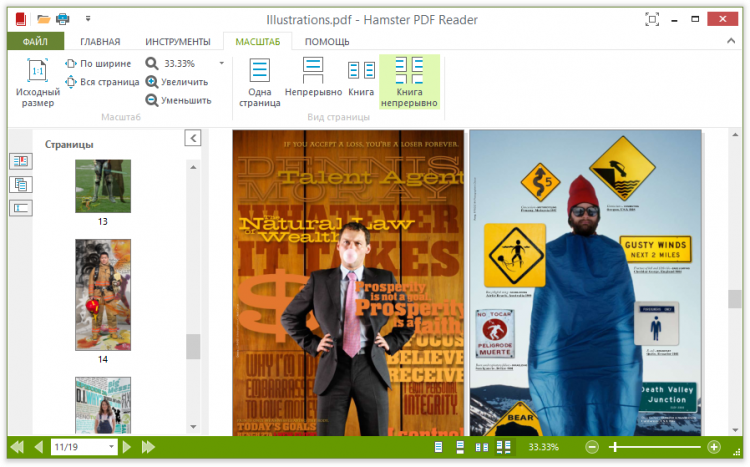
  • Intuitive interface. The minimalistic interface is identical to the design of programs from Microsoft, so Hamster PDF Reader is perceived as a standard Windows offering. All functions are located at the top of the screen and divided into simple categories. Thanks to the zoom function, the user can view multiple pages at the same time. The interface is available in English and Russian.
  • High performance. Hamster PDF Reader opens PDF files instantly and does not consume a lot of resources. Thanks to optimization, zooming functions, switching from one open file to another and search by phrases work instantly, without delays.
  • Support for non-standard formats. In addition to PDF files directly, the program works with less common formats, including DJVU, CHM, MOBI, and XPS.
  • Additional features. Hamster PDF Reader supports text editing, search for a given phrase, selecting and copying text segments, and transferring them to other programs. The utility works both in full-screen and portable mode.

Download the current version of Hamster PDF Reader from the Freesoft portal. All files are thoroughly checked, so the installation is absolutely safe, without ads and viruses.

How to Install Hamster PDF Reader on Windows

  1. Download the installer — Click the "Download" button above to save the setup file.
  2. Run the installer — Double-click the downloaded .exe file. If Windows SmartScreen appears, click "More info" then "Run anyway."
  3. Accept UAC prompt — Click "Yes" when the User Account Control dialog appears.
  4. Choose install options — Select the installation folder (default is recommended) and click "Install."
  5. Launch — After installation completes, click "Finish" to open Hamster PDF Reader.

File size: 4.59 MB. Compatible with Windows XP, Vista, 7, 8, 10, 11.

What's New in Hamster PDF Reader 2.0.0.39

  • Latest stable release with performance improvements
  • Support for multiple document formats including DJVU, CHM, MOBI, and XPS
  • Optimized text search and phrase highlighting within PDF files
  • Bug fixes and stability enhancements

Last updated: October 27, 2018

Frequently Asked Questions

Is Hamster PDF Reader free to download?

Yes, Hamster PDF Reader is completely free software distributed under a FreeWare license. The 4.59 MB installer can be downloaded from this page without any cost or registration. There are no hidden fees, trial periods, or premium tiers associated with this program.

Is Hamster PDF Reader safe to download from freesoft.net?

The installer has been verified with VirusTotal and confirmed to be free from malware. Freesoft.net provides the original, unmodified file from the developer HAMSTER soft. No repackaging or bundled software is included in the download.

What are the system requirements for Hamster PDF Reader?

Hamster PDF Reader runs on Windows XP, Vista, 7, 8, 10, and 11, supporting both 32-bit and 64-bit systems (x32/x64). The installer is only 4.59 MB, making it one of the lightest PDF readers available. It consumes minimal system resources even when handling large documents.

How to install Hamster PDF Reader on Windows?

Click the "Download" button on this page, then run the downloaded .exe file and follow the setup wizard. The installation takes under a minute due to the small file size. Once finished, the program is ready to open PDF, DJVU, CHM, MOBI, and XPS files.

What are the best alternatives to Hamster PDF Reader?

Popular alternatives include Adobe Reader (version 23.006.2), Foxit Reader (version 2023.2.0), Sumatra PDF (version 3.4.6), and PDF-XChange Editor (version 10.1.0.3). Foxit Reader and PDF-XChange Editor offer more advanced annotation tools, while Sumatra PDF matches Hamster PDF Reader in being lightweight and fast.

Versions

If you have information about available versions of the software, you can . send it to us.

Rating

5
3 ratings
Click, for a quick estimate

Leave a review

Your name*
Your email*
Comment*

Reviews