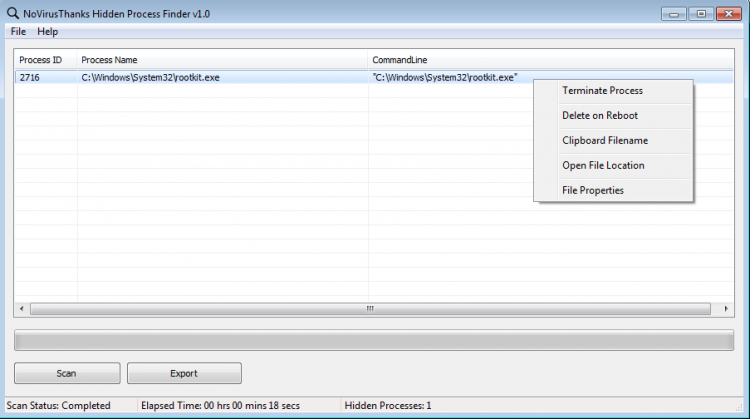
Hidden Process Finder is a program that can detect and remove hidden processes from the system. Some malicious programs hide their processes, so it is impossible to detect them with the standard Task Manager. This program is designed to combat such processes.
Hidden Process Finder scans the system rather quickly and then displays a list of detected processes. Right-clicking on a process opens a context menu which can be used to stop and/or delete the process (after restarting), copy its name to the clipboard, go to the folder with files and view detailed properties of the process.
Besides processes belonging to rootkits, Hidden Process Finder also shows system processes hidden for security reasons.
File size: 1.31 MB. Compatible with Windows XP, Windows Vista, Windows 7, Windows 8, Windows 10 (x32/x64).
Last updated: October 27, 2018
Download the setup file from this page and run the .exe installer. The program is only 1.31 MB, so the download completes quickly. After installation, launch the application with Administrator privileges to allow full system scanning access.
Hidden Process Finder detects processes that are invisible to the standard Windows Task Manager. These may include rootkit-hidden malware or legitimate system processes concealed for security reasons. Click the scan button, wait for the analysis to finish, and review the list of detected entries.
Yes. The program is developed by NoVirusThanks, a security software company. It only reads process information during the scan and does not modify your system unless you explicitly choose to stop or delete a specific process through the context menu.
Hidden Process Finder supports Windows XP through Windows 10 in both 32-bit and 64-bit editions. The installer is 1.31 MB and requires minimal disk space. Running the program as Administrator is recommended for complete scan results.
Not every hidden process is malicious. Windows itself hides certain system processes for security reasons, and these will appear in the scan results. Focus on unfamiliar entries or processes located in unusual folders. Right-click any suspect entry to view its properties and file location before deciding to stop or remove it.
To rate Hidden Process Finder you need to register or log in on our website
All files provided on this site are original, we do not repackage or modify the files.
Mail domain must match the domain of the developer's site
A link to confirm registration was sent to your email

 Русский
 Français



 Download